
If you came here looking for a Longfu88 download file for Android, the direct answer saves you a risky detour. Longfu88 does not offer an APK or an app-store listing on its own pages. What the operator does publish is a Create Shortcut page with an Android section and an iOS section; a home-screen shortcut puts an icon on your phone that opens the mobile site. Everything below covers how to set that up, what the browser account can do, and how to tell a real shortcut from a file someone else has wrapped in the brand name.
On the brand’s own pages, no. There is no download button for an installable file, no version number and no Google Play or App Store badge. The mobile route the operator points phones to is a home-screen shortcut to the mobile site.
That is not the same as saying an APK could never exist. It means that nothing on the operator’s own pages distributes one, so a file advertised elsewhere as the Longfu88 app has no traceable source. Treat the brand’s Create Shortcut route as the only one you can tie back to the operator.
The practical difference is small, because the mobile site is not a cut-down version. A full cycle runs in a phone browser: registration with the welcome bonus chooser inside the form, the deposit cashier with all its tabs, the SABA sportsbook with its bet slip, the profile with VIP and Coins, and the withdrawal screen.
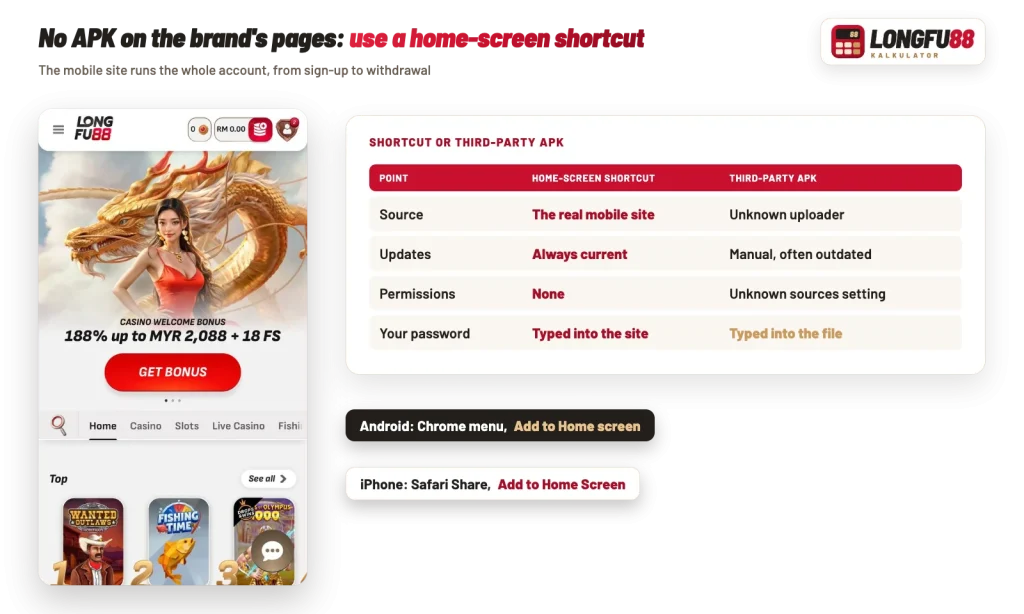
In general, Android handles this through Chrome’s own menu, and the steps look the same on most handsets. Nothing is installed and no permission dialog appears.
If your launcher asks where to place the icon, drop it on the first screen. That is the whole point of the exercise: one tap instead of typing anything.
The shortcut is built from whatever page you are standing on, so set it up from the mobile site itself.
An APK file does not install on an iPhone at all, and the brand’s Create Shortcut page has an iOS section of its own. As a rule it goes through Safari rather than a third-party browser:
The icon then behaves like any other on your springboard. Because it opens the live site, there is no app update to chase and no storage to clear.
| Point | Home-screen shortcut | Third-party APK |
|---|---|---|
| Source | Created by you from the operator’s own mobile site | Hosted by an unrelated site you cannot verify |
| Updates | None needed; the icon always opens the current site | Manual reinstall of whatever that site posts next |
| Permissions | None requested | Needs install from unknown sources, and may ask for more |
| Login safety | Credentials stay in your browser | Login screen is controlled by whoever built the file |
| Storage | Effectively an icon | A full package on your device |
The table makes the trade clear enough. A shortcut gives you one-tap access with no software risk, while a sideloaded package takes on an unknown publisher in exchange for convenience you already have.
In general, an APK is a complete application, and whoever compiles it decides what it does. A modified build can show a convincing login form and send what you type somewhere else. Run the checklist below before you install anything branded as a casino app.
Keep in mind
A file named Longfu88 APK on another site is not something the brand offers on its own pages. Nothing is being withheld from mobile users, so there is no reason to go looking for an installer.
The browser account is the full account, which is the reason the shortcut is enough. Deposits start at RM30 on Touch ‘n Go eWallet, DuitNow QR, bank transfer and FPX, and at RM50 on the crypto tab for USDT networks such as TRC20, BEP20, ERC20 and Solana. Note the gap: the cashier accepts RM30, but every welcome bonus needs a first deposit of at least RM50, so a RM30 mobile top-up qualifies for nothing. If you plan to claim an offer, deposit RM50 or more from the start and pick the offer before you bet.
Withdrawal requests work the same way on a phone, inside the same limits. The bank and Touch’N’Go tab starts at RM55, the crypto tab at RM100, and no single transaction can exceed RM2,020. So a RM300 cash-out is one request, while RM5,000 is three (RM2,020 + RM2,020 + RM960), with a ceiling of five pending requests at any time and a monthly cap set by your VIP level. Under the terms, requests are processed within 3 business days after checks.
For context on how the lobby, cashier and sportsbook fit together, the overview of what the casino covers for Malaysian players walks through each section. Account access itself, including the registration fields and the profile panel, is covered under signing in on your phone.
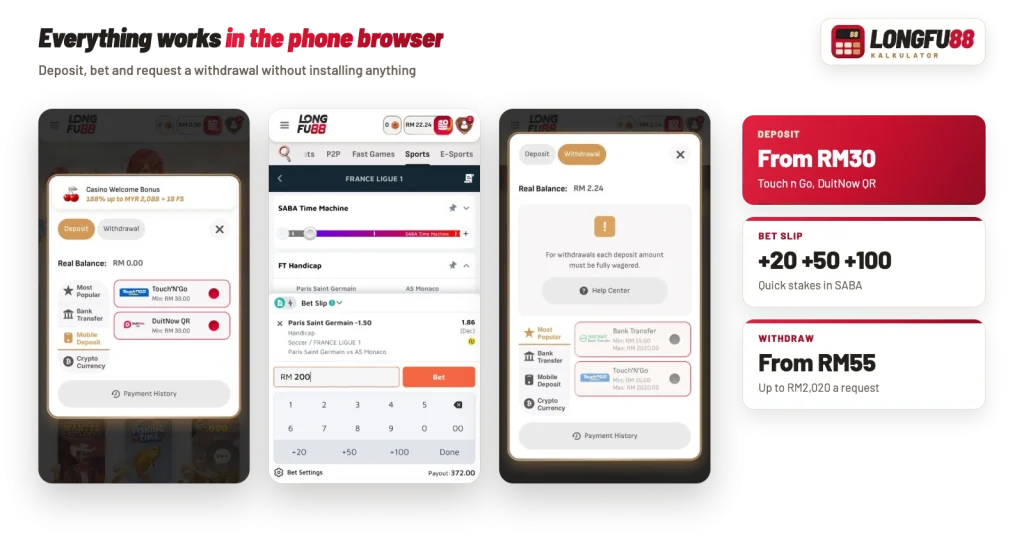
Three things make a difference once the icon is on your home screen. In the SABA bet slip, the quick-stake buttons add +20, +50 and +100 to the amount, which beats thumbing numbers into a keypad while a live market moves, and the slip shows the payout before you confirm. The chat bubble sits on every screen, so a cashier question does not need you to hunt for a contact route. And the header keeps your balance in ringgit next to the red deposit button, with the Coins counter beside it, so you can see both without opening the profile.
One more habit: if you leave the session logged in for convenience, put a screen lock on the phone. The shortcut makes the account one tap away for you, and for anyone else holding the handset. This desk’s guidance is for adults 21 and over, and you should check the law where you live before you play.
